ATS-friendly resume section headings
Updated 22 October 2026. Parsers do not admire a witty section title. They look for a short label they already know, then file the lines under it until the next label. If the only name for your jobs is “My Journey” or “Where I’ve Made an Impact”, the jobs can be stored as a blob, or not stored as jobs at all. Use the ResumeATS builder for the file you will submit, and use the paste box when you want to test a resume you already wrote.
The safe list this checker recognizes
The lint treats these labels as standard, in any mix of capitals, after a trailing colon is removed: Experience, Work Experience, Professional Experience, Employment History, Work History, Employment, Education, Academic Background, Skills, Technical Skills, Core Competencies, Core Skills, Summary, Professional Summary, Profile, Objective, Certifications, Licenses, Licenses and Certifications, Projects, Languages, Awards, Volunteer, Volunteer Experience, Publications, Contact, and Contact Information.
That is a practical list, not a claim that every vendor shares one dictionary. It is the list this page checks. If you want the smallest set, use Summary, Experience, Education, and Skills. Add Certifications or Projects only when you have something to put under them. Do not invent a fifth name for work history.
A paste that fails, on purpose
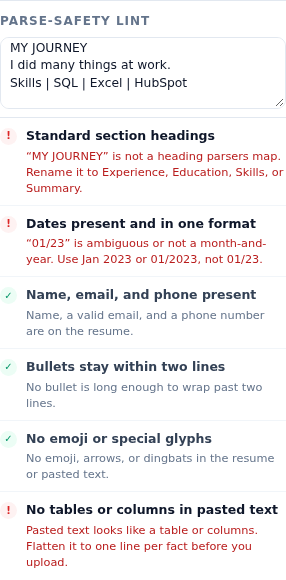
Load the sample so the rest of the resume is healthy. Then paste this into Parse-safety lint:
MY JOURNEY
I did many things at work.
Skills | SQL | Excel | HubSpot
Two checks fail for reasons that belong in this guide. Standard section headings fails, and the hint is exact: “MY JOURNEY” is not a heading parsers map. Rename it to Experience, Education, Skills, or Summary. The table check also fails, because the skills line uses pipes. That second failure is covered in the rejection guide. The heading failure is the one to fix here: change the line to Experience, and put the jobs underneath it as ordinary lines, not as a slogan.
The builder’s own preview never produces “MY JOURNEY”. Its section labels are the three words Experience, Education, and Skills. When the paste box is empty, the lint passes and says the builder headings are those three. Paste is how you test a file from somewhere else.
Where people hide the real heading
A creative title next to a standard one is less dangerous than a creative title alone. “Career story” as a subhead under Experience is clutter, but the standard line is what the scan looks for. The failure mode is a one-column document whose only work-history label is a phrase the dictionary does not contain. The lint flags a short title-case or all-caps line, up to five words, that is not on the safe list. It also flags a longer paste that never contains Experience, Work Experience, Professional Experience, Employment History, Work History, or Employment.
Do not put the only copy of your email in a running header. The builder places the name and contact line in the body. A heading called Contact is optional. The contact check looks for a name, a valid email, and a phone number, not for the word Contact.
Order that keeps the labels useful
Use this order unless your field has a strong reason not to: name and contact, then Experience, then Education, then Skills. Projects can sit after Experience if the projects are the proof and the jobs are thin. Certifications can sit with Education. The Jordan Avery sample follows Experience, Education, Skills, and the dates on each entry use one month-and-year style. The heading and the date are a pair: a parser that finds “Experience” still has to find “Jan 2021 – Present” on the role under it.
Avoid labels that describe you instead of the section: About Me, My Story, Toolbox, Superpowers, What I Bring, Where I’ve Been. They read well to a friend and poorly to a dictionary. If a portfolio site needs the playful version, keep a second file. The file you upload gets the boring labels.
How to check a heading list tonight
- Copy the resume as plain text, not as a screenshot.
- Paste it into the lint box on the builder.
- If a heading is named in the red hint, rename that line to the suggested standard word. Do not add the standard word underneath and leave the creative line as the only label a scan might treat as the heading.
- Confirm the preview of a new file, if you are rebuilding it here, shows Experience, Education, and Skills and nothing else.
- Re-paste. The headings row should pass, and the hint should say the pasted headings match the safe list, as long as an experience label is present on a longer paste.
Related reading: ATS resume checklist and Why ATS rejects a resume instantly. Then run it on the ResumeATS builder.
Questions
Which headings does the ResumeATS builder use?
Experience, Education, and Skills. The parse-safety lint says so when the paste box is empty: builder headings are Experience, Education, and Skills.
What does the lint say about a heading called MY JOURNEY?
It fails the standard-headings check and says “MY JOURNEY” is not a heading parsers map. Rename it to Experience, Education, Skills, or Summary.
Do I need a heading on the contact block?
No. Put the name, email, and phone in the body at the top. The builder does not label that block Contact, and the lint does not require that label.