Why ATS rejects a resume instantly
Updated 23 October 2026. “Rejected instantly” is a feeling with several causes, and only some of them are on the resume. This page is about the ones you can see with the parse-safety lint in the ResumeATS builder. It is not a model of any vendor’s knockout rules, and it will not tell you why a specific company sent a note five minutes after you applied.
Separate a blank parse from a no
If the portal’s preview of your application shows an empty experience section, a missing phone, or skills mashed into the wrong field, the file was hard to read. If the preview looks complete and the rejection was instant, look at the questions on the form: sponsorship, location, a license, a shift you said you would not work. Those rules fire on the answers, not on your prose. Fixing fonts will not change them. This tool never receives those answers, so a green lint does not mean the form will accept you.
The lint is a local checklist of six rows: standard headings, dates in one format, name plus email plus phone, bullets that stay within about two lines, no emoji or dingbats, and no tables or columns in text you paste. The builder itself is one column and has no tables, so the last row passes when the paste box is empty.
One paste, three failures
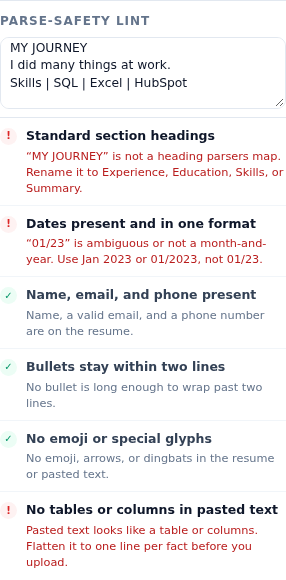
Load the sample. Change the first start date to 01/23. Paste this into the lint box:
MY JOURNEY
I did many things at work.
Skills | SQL | Excel | HubSpot
The panel then shows three failures and three passes. Standard section headings fails, and the hint quotes “MY JOURNEY” and tells you to rename it to Experience, Education, Skills, or Summary. Dates present and in one format fails, and the hint quotes “01/23” and tells you to use Jan 2023 or 01/2023, not 01/23. No tables or columns in pasted text fails, because the skills line has more than one pipe, which the check treats as a table. Name, email, and phone still pass, because the sample contact block is intact. Bullets stay within two lines still passes. No emoji or special glyphs still passes. That is a useful split: the file is not “bad at everything”. Three specific shapes are unreadable, and the contact block is fine.
What each failure does to a parse
A non-standard heading removes the label a parser uses to decide that the following lines are jobs. The jobs may survive as loose text, which is not the same as a work-history field a recruiter can filter. A two-digit date or a mix of Jan 2021 and 01/23 makes the start and end unreliable, so a filter on years of experience is filtering on a guess. A pipe row, a tab, or a line with several wide space-gaps is the flat shadow of a table or a two-column template. Parsers often read across the gap and stitch the left column to the right column. The phone number ends up in a bullet, or the skills read as a job title. Emoji and arrows are a smaller failure, but they are the sort of character that becomes a missing box or a broken line. The check looks for those symbols in the form and in the paste.
A bullet longer than 180 characters fails the length row. That threshold is about two lines on this page’s A4 preview, not a rule from a vendor. A wall of text is harder to scan after it has been extracted, because the line breaks that made it look designed are gone. Split it into two bullets that each contain one result.
Order of fixes
- If you pasted a designed resume, rebuild it in the form instead of fighting the paste. The preview has Experience, Education, and Skills, and the contact fields are separate inputs.
- Clear the red heading. One standard label is enough.
- Put every date back to a month and a four-digit year, with Present only on the current role. The sample’s latest role is Jan 2021 – Present until you change it.
- Remove pipes, tabs, and emoji from the paste. Re-run the lint until the six rows are green.
- Only then open the match report. A missing keyword on a file that did not parse is an edit the employer may never see.
The sample with no paste and with its original dates passes all six rows. That is the baseline. Your file does not need to look like Jordan Avery. It needs to fail none of the six, for the reasons printed under each row, before you spend an evening chasing synonyms.
Related reading: ATS-friendly resume section headings and Resume date format for ATS parsers. Try the edit in the ResumeATS builder.
Questions
What did the sample paste fail for?
Three rows. Standard section headings failed on “MY JOURNEY”. Dates failed on “01/23”. Tables failed because the skills line used pipes. Name, bullets, and glyphs still passed.
Does a fast rejection email always mean the resume failed to parse?
No. A form can also reject on an answer you typed, such as work authorization, before anyone reads the file. This checker does not see those answers. It only lints the resume text you typed or pasted.
What should I fix first?
The failure that deletes text: a table or a heading the parser cannot name. Then the date that is ambiguous. Then a missing email or phone. A missing keyword is a later edit, on a file that can be read at all.