Check a resume against a job description
Updated 23 October 2026. This is a walkthrough of one check, not a promise about any employer’s software. Open the ResumeATS builder, load the sample resume, paste one job description, and read the match report before you change a single bullet.
What the report actually extracts
The match report stays in the browser. It does not upload the posting or the resume. It splits both texts into tokens, drops a fixed stopword list (words such as “the”, “and”, “required”, “experience”, “team”), and keeps skill-like short tokens such as SQL. A bigram is kept only when two kept tokens sit next to each other with a single space between them, so “lead scoring” counts and a period does not glue the last word of one sentence to the first word of the next.
Every kept unigram and bigram from the job description is a “job term”. The percent is matched terms divided by all extracted job terms, rounded to the nearest whole number. A term is matched when the same token or the same two-word phrase appears at least once on the resume. It is missing when the count on the resume is zero. It is over-used when that resume count is greater than three. Over-used terms are still matched. The percent does not give you extra credit for repeating a word, and it does not subtract points for repeating one.
The worked example
Click Load sample resume. The preview is Jordan Avery, Senior Marketing Operations Manager, with three roles, an economics degree, a HubSpot Academy certificate, and 18 skills. Then replace whatever is in the job box with this posting, exactly:
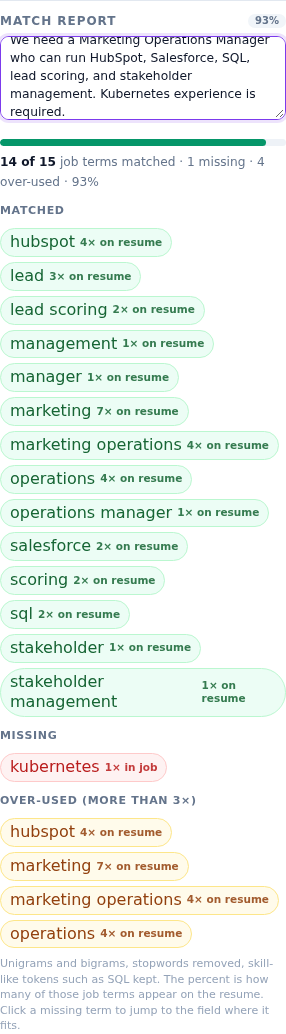
We need a Marketing Operations Manager who can run HubSpot, Salesforce, SQL, lead scoring, and stakeholder management. Kubernetes experience is required.
The report then reads: 14 of 15 job terms matched · 1 missing · 4 over-used · 93%.
Matched, with the resume counts the chips show: hubspot 4×, lead 3×, lead scoring 2×, management 1×, manager 1×, marketing 7×, marketing operations 4×, operations 4×, operations manager 1×, salesforce 2×, scoring 2×, sql 2×, stakeholder 1×, stakeholder management 1×. Missing: kubernetes 1× in the job. Over-used: hubspot 4×, marketing 7×, marketing operations 4×, operations 4×.
Those counts are why a single “match score” is a bad editing plan. Fourteen of the fifteen terms are already on the file. The useful edit is the one gap you can defend, not another pass that adds “marketing” for the eighth time.
What to do with the missing term
Click the kubernetes chip. The builder switches to the Skills tab and puts “kubernetes” in the skill field. It does not add the chip for you. Press Enter only if you have actually used Kubernetes and could talk about it. Jordan’s sample never mentions it, in skills or in bullets, so the honest move is to leave the field and apply to a posting that does not require it, or to add a true bullet if you have the work and this sample simply is not your life.
A title-shaped phrase such as “operations manager” focuses the job title of the first role instead of Skills. The same rule applies: do not paste a title you have not held. The jump is a pointer, not permission to invent a line.
How to read the noisy terms
Not every extracted term is a skill. In a longer posting the report will also surface ordinary verbs that survived the stopword list. Ignore a word when it is not something a recruiter would type into a search box. Act on tools, methods, credentials, and the job title when they are true. SQL is kept even though it is three letters, because the extractor treats it as a skill-like token. That is why the sample shows sql 2×: once from the skill list and once from the Brightline bullet that says “reporting templates in SQL and Tableau”.
If you only had time for one edit on this posting, it would not be a keyword dump. It would be a decision about Kubernetes. Everything else in the short posting is already visible in the latest role or the skills line.
Steps to repeat on your own file
- Open the builder and load your resume, or start from the sample so you can see a known result first.
- Paste the whole posting, including the requirements lines, into the match report box.
- Read the line under the bar before you read individual chips. You want the matched count, the missing count, and the percent together.
- Open Missing and click only the terms you can truthfully add. Let the field focus tell you whether the builder thinks it belongs in Skills or in the job title.
- Open Over-used. If a tool you really use is listed, you do not have to delete it, but do not add another copy. Put the proof in one bullet and leave the skill list at a single mention.
- Download the plain-text file or the PDF only after the missing list is either closed or consciously skipped.
A 93% result on a short posting can still be the wrong job. The report cannot tell whether you want the work. It can tell you that one required word is absent and that four phrases are already repeated often enough.
Related reading: Resume keywords without stuffing and Resume date format for ATS parsers. Then run it on the ResumeATS builder.
Questions
What does the ResumeATS match percent measure?
It is the share of extracted job terms that also appear on the resume. On the Jordan Avery sample, the short marketing-operations posting in this guide matches 14 of 15 terms, which the report shows as 93%.
Which term was missing in the worked example?
Kubernetes. The posting says Kubernetes experience is required, and the sample resume never uses that word, so the missing list shows kubernetes 1× in job.
What does over-used mean in the match report?
A job term that appears more than three times on the resume. In the sample run, hubspot is 4×, marketing is 7×, marketing operations is 4×, and operations is 4×.