Resume date format for ATS parsers
Updated 23 October 2026. A parser turns a date range into a start, an end, and a length of time. It can do that when every range looks like the same kind of thing. It stumbles when one job says Jan 2023 and the next says 01/23, or when the end of a current job is blank. Fix the pattern in the ResumeATS builder before you debate fonts.
One style, used everywhere
Pick one of these and do not mix them. Month and four-digit year: Jan 2021, or January 2021. Or numeric month and four-digit year: 01/2021. The sample uses the first of those, with a three-letter month. Present is allowed as the end of a role you still hold. It is not a format family of its own, so a file can say Jan 2021 – Present and Mar 2018 – Dec 2020 and still be one style.
Do not use a two-digit year. 01/23 can be read as January 2023, as 2023 in a day-first country, or as the 23rd of a month. The lint treats 01/23 and any other two-digit year as a failure even before it looks at consistency. Do not use a season (Fall 2022), a quarter (Q1 2022), or a day (15/06/2024) on a US-style corporate resume. Days belong on a form, not on the resume line.
What the sample does
Load sample resume and leave the dates alone. The lint row “Dates present and in one format” passes, and the note says every filled date uses the same month style. The ranges on the preview are:
- Senior Marketing Operations Manager, Northwind Analytics — Jan 2021 – Present
- Marketing Operations Specialist, Brightline Software — Mar 2018 – Dec 2020
- Marketing Coordinator, Coastline Media — Jun 2016 – Feb 2018
- B.A. Economics, University of California, Berkeley — Aug 2012 – May 2016
- Marketing Operations Certification, HubSpot Academy — Jan 2020 – Mar 2020
The certificate overlaps the Brightline job. That is allowed. Overlap is not a format error. Each entry still has a start and an end, and each one uses a month plus a four-digit year. The plain-text download prints the same ranges, with an en dash, under each role.
The failure you can reproduce
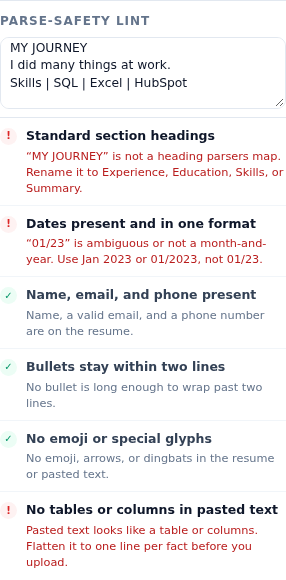
Open the Experience tab and change the first start field from Jan 2021 to 01/23. Leave the other dates as they are. The date row fails. The hint quotes the bad value: “01/23” is ambiguous or not a month-and-year. Use Jan 2023 or 01/2023, not 01/23. Two things are wrong at once. The year is two digits, and the file now mixes a numeric short date with the month-name dates on the other rows. Either problem is enough to fail the row. Put the field back to Jan 2021 and the row passes again.
An empty start or end fails too, with a count of empty fields. Do not leave the end blank to mean “I still work here”. Type Present. The sample’s latest role is the pattern: a month-year start and the word Present.
Why the format is the whole check
This lint does not calculate years of experience, and it does not guess that “03/21” means March 2021 in the United States. It classifies each filled field as a month name plus a year, a MM/YYYY number, a four-digit year alone, a two-digit year, or something else. Zero empty fields, zero odd values, and at most one of those families: pass. Year-only (2021) is a family. If you use it on education and month-year on jobs, the row fails for mixing families. The sample does not do that. Education uses Aug 2012, not 2012.
Right-aligning dates in a table is a separate problem. The builder puts the date on the same line as the job title, in the body, not in a table cell. If you paste a resume that uses spaces or tabs to fake a date column, the table check fails even when the date strings themselves are fine. Flatten the line to “Job title, Company, Jan 2021 – Present” before you upload that paste.
A short editing pass
- Write the month the same way every time. The sample uses Jan, Mar, Jun, Aug, Dec, Feb, May. Three letters are enough. Do not switch to “January” halfway down.
- Use a four-digit year. 2021, not 21.
- Put Present on the current role only. A job that ended gets a real end month.
- Fill education and certificates with the same style, even if you only remember a season. Convert Fall 2012 to Aug 2012 or Sep 2012 and stay consistent.
- Reload nothing. The lint updates as you type. When the row is green, download the text file and confirm the ranges survived as plain lines.
Related reading: ATS-friendly resume section headings and Why ATS rejects a resume instantly. Check a file in the ResumeATS builder.
Questions
What date style does the sample resume use?
Month and a four-digit year. The latest role is Jan 2021 – Present, the middle role is Mar 2018 – Dec 2020, and the earliest role is Jun 2016 – Feb 2018. Education is Aug 2012 – May 2016 and Jan 2020 – Mar 2020.
What does the lint say when a date is 01/23?
Dates present and in one format fails. The hint says “01/23” is ambiguous or not a month-and-year. Use Jan 2023 or 01/2023, not 01/23.
Does Present count as a second date format?
No. Present is the end marker for a current role. The sample uses it once, on the latest job, and the lint still reports one month style.