Plain text resume for online forms
Updated 23 October 2026. Some applications never want a file. They want you to paste your history into a box that throws away fonts, columns, and anything that is not a character. A plain text resume is that paste, saved as a .txt so you are not reformatting it at 11 p.m. The ResumeATS builder writes it from the same fields as the preview.
When the text file is the application
Use it in three cases. The form says “paste your resume” and gives you a large textarea. The upload control accepts .txt and you have already had a PDF come back with blank sections. Or you are emailing a recruiter who asked for “the text, not an attachment”. Do not use it as your only copy when the posting says PDF or Word and the upload works. A text file is the fallback and the paste source, not a nicer design.
The preview on this site is already one column of real text. Download PDF opens the browser print dialog and hides the navigation, the form, and the score. What prints is the article on the page. Because those words are characters in the HTML, not a picture, the PDF a browser saves has a text layer you can select. That is the right PDF to upload when a PDF is allowed. It is the wrong thing to paste into a box: you would be pasting a file, or a mess of line breaks from a copy out of Preview. The .txt button is the paste.
The sample, as downloaded text
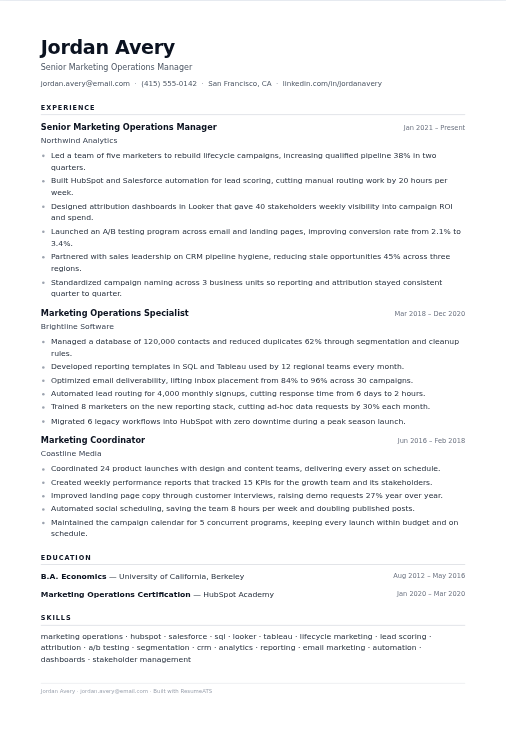
Load the sample and click Download .txt. The file is named resume.txt. The top of it is:
Jordan Avery
Senior Marketing Operations Manager
jordan.avery@email.com | (415) 555-0142 | San Francisco, CA | linkedin.com/in/jordanavery

EXPERIENCE

Senior Marketing Operations Manager | Northwind Analytics
Jan 2021 – Present
- Led a team of five marketers to rebuild lifecycle campaigns, increasing qualified pipeline 38% in two quarters.
- Built HubSpot and Salesforce automation for lead scoring, cutting manual routing work by 20 hours per week.
The rest of the file continues the same way. Each later role is a blank line, a title and company separated by a vertical bar, the date range on its own line, and one dash per bullet. Education follows the same shape: “B.A. Economics | University of California, Berkeley” and “Aug 2012 – May 2016”. Skills are one line of comma-separated names under the heading SKILLS. There is no table, no icon, and no header that repeats on a second page, because there are no pages. A paste box will show almost the same thing you see in a text editor.
How to clean a paste that came from somewhere else
If you already have a Word file, you can still use the text download here as the model. The habits that keep a paste readable are the ones the file above already follows.
- One fact per line. A job title does not share a line with three columns of dates created by tabs.
- A dash and a space for a bullet. Decorative dots and emoji become junk in some boxes. The lint on this site flags emoji if you paste them into the check.
- Blank lines between sections, not a row of underscores or a text box.
- The same date style as the rest of the resume. The sample’s text file says Jan 2021 – Present, not a mix of styles.
- Contact details in the first three lines, in the body. If the only phone number lived in a Word header, it will not be in the paste unless you type it here.
After you download, open resume.txt, copy all of it, and paste it into a blank note or a draft email. If a line wraps in an ugly place, that is the box’s width, not a missing format. You should still be able to find the name, the three employers, and the skills line without guessing which column they came from.
What this file will not do
It will not include a photo, a chart, or a two-column sidebar, because the builder never had those. If your designed resume depended on a sidebar for the skills, those skills are simply a line in this file, which is what you want in a paste box. It will not translate your bullets. The words in the text file are the words in the form, including a weak bullet if you left one in. Read the first two Northwind bullets in the sample: they name a team size and a percentage, then HubSpot, Salesforce, and a count of hours. That is the level of detail to keep when you replace the sample with your own roles.
Save the PDF as well if the posting accepts a file. Use the text file for the box. They are two exports of one resume, not two different stories. If you edit a bullet, download the text file again. The browser keeps the form in localStorage on this device, but the .txt on your computer does not update itself.
Related reading: Check a resume against a job description and Why ATS rejects a resume instantly. Check a file in the ResumeATS builder.
Questions
When should I use a plain text resume?
When the application gives you a box to paste into, or when a portal asks for a .txt file. A designed PDF is the wrong thing to paste, because the box wants characters, not a layout.
What does ResumeATS put in the .txt download?
The name, the latest job title, a contact line joined with vertical bars, then EXPERIENCE, EDUCATION, and SKILLS. Each role is a title, a company, a date range, and dashes for bullets.
Does the PDF replace the text file?
No. Download PDF prints the on-screen resume, which is real HTML text, so Save as PDF keeps a selectable text layer. Download .txt is the copy you paste into a form. Keep both.